Guide to Authorization in Filestash
This is guide 3 of 3 covering the triptych: storage, authentication, and authorisation, which together form the basis of a good file management platform where you stay in control of “who can do what and where”. This episode covers authorisation.
What is authorisation about?
Authorisation is one of those topics that confuses a lot of people. After years of calls with organisations of all sizes, we’ve found it helps to start from first principles.
A Filestash deployment will typically have 3 components configured to answer 1 question: “who can do what and where?” with the 3 components being: storage, authentication, and authorisation. Storage is the “where”, authentication is the “who”, and authorisation is what links them together: the “… can do what …” that sits between identity and resource.
Many platforms push RBAC as the default model. Filestash doesn’t. RBAC is overkill for simple use cases and often too blunt for complex ones. What matters is the underlying model, which is the same regardless of implementation: after authentication, Filestash receives some information about the user as part of its session. That information can be anything (AD groups included). The authorisation layer takes that identity, looks at what the user is trying to access, and runs a function that returns one of two answers: grant or deny. Formally: f(identity, resource) -> grant | deny. The guide is a tour of the various implementations of that function, of which RBAC is just one particular implementation.
Option 1: Inline access control
The simplest and most direct approach. When a user authenticates, their session is populated with attributes from your IDP. Those attributes are then used to compute access rights on the spot, expressed as a set of allowed filesystem operations: ls, cat, mkdir, mv, rm, touch, save. You can either hardcode those rights directly, or define rules that compile down to them.
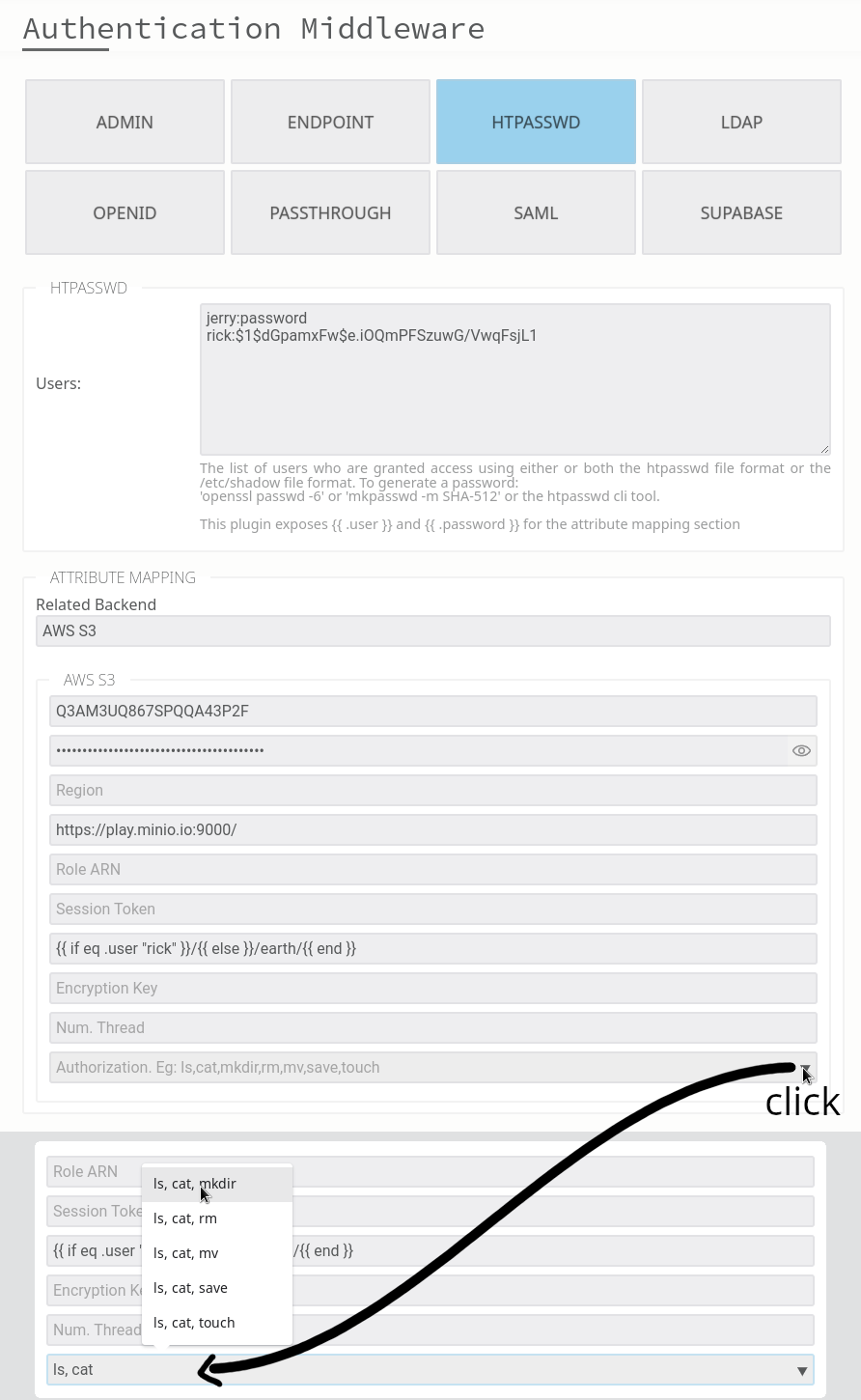
In this example, we enforce read only access to our storage. This effectively blocks users from creating new files or folders, uploading content, moving items, or deleting anything.
The power come when you create rules based on any attribute returned by your IDP:
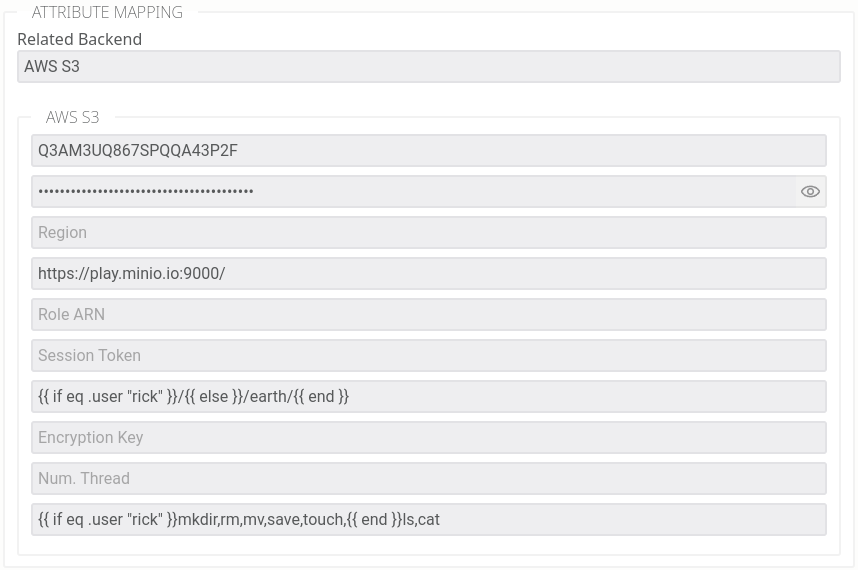
In this example, rick is allowed to perform all actions everywhere, while everyone else is limited to read only access, meaning they can list files within the “earth” bucket and download its contents.
Finally you can extend everything with additional controls:
- chroot jails: lock users into a specific folder, preventing navigation above it
- allow lists: filter what is visible within the accessible tree, useful for hiding folders without denying the parent path
- read only folders: restrict write operations on specific paths
- virtual filesystem: apply access rules to paths that don’t physically exist on the storage, letting you present a structure independent of what’s actually there
Option 2: RBAC
RBAC maps the authorisation function to roles: f(role) -> permissions. It’s the most widely used model, and for good reason. When your access patterns map naturally to roles, it’s clean and easy to reason about.
The practical test: take a sheet of paper and sketch your access patterns. If they summarise neatly into roles, RBAC is a good fit. If you find yourself contorting the role model to cover edge cases, it probably isn’t.
Once enabled in Filestash, it looks like this:
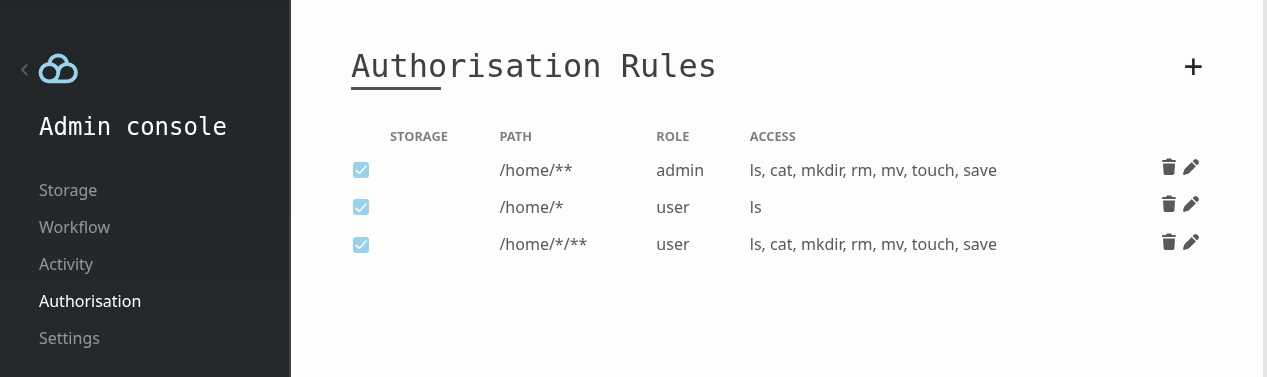
Given a role derived from the authentication output, you define the rules that determine what that role can access and how.
Option 3 & 4: External delegation
Sometimes you might want to externalise the whole authorisation to a third party system, which is what these two options are about:
- Option 3: plg_authorisation_cerbos: delegates to Cerbos, an open-source policy-as-code engine.
- Option 4: plg_authorisation_iam: delegates to AWS IAM.
Option 5: Custom plugin
If your use case grows in complexity and none of the ready-made options work for you, you can write your own authorisation plugin. Historically, this meant you had to implement this interface in Go and compile the plugin in:
type IAuthorisation interface {
	Ls(ctx *App, path string) error
	Cat(ctx *App, path string) error
	Stat(ctx *App, path string) error
	Mkdir(ctx *App, path string) error
	Rm(ctx *App, path string) error
	Mv(ctx *App, from string, to string) error
	Save(ctx *App, path string) error
	Touch(ctx *App, path string) error
}
These days, you can run authorisation without recompiling anything through runtime plugins, which get compiled to WASM from your favourite language, mine being Rust. Let’s say I want to allow read-only access while denying access to any path containing a segment named top_secret:
use filestash::*;

#[derive(Default)]
pub struct Plugin;

impl Authorisation for Plugin {
    fn ls(&self, _ctx: &impl Context, path: &str) -> Decision {
        self.check(path)
    }
    fn cat(&self, _ctx: &impl Context, path: &str) -> Decision {
        self.check(path)
    }
    fn stat(&self, _ctx: &impl Context, path: &str) -> Decision {
        self.check(path)
    }
}

impl Plugin {
    fn check(&self, path: &str) -> Decision {
        if path.split("/").any(|segment| segment == "top_secret") {
            log::warn!("[TOPSECRET] access denied !!");
            return Decision::Deny;
        }
        Decision::Allow
    }
}

register!(Plugin: Authorisation);
In all the use cases we’ve seen so far, this interface has never been defeated. To illustrate: we built a custom plugin for a strata management company in California. Each S3 bucket represented a unit under their management. Homeowners had read-only access to their own unit but were blocked from folders containing accounting, invoices, and other management documents, which were only accessible to board and committee members with rules defined per unit. Homeowners could own multiple properties and act in different roles depending on the unit. Managers had broader access; admins had full access. The edge cases were complex enough that we fully unit tested the access rules, but more importantly, the underlying model never failed: given who the user is and what they are trying to access, return grant or deny.
The rule of thumb: use simple solutions for simple problems. When your use case grows complex, Filestash has the flexibility to go as far as you need.
What next?
This guide was about 1 of the 3 pillars. Read about the other 2: storage and authentication.