API & Gateways
Filestash lets you interact with any kind of remote storages via its API, and through Gateways that expose your data over protocols like SFTP, MCP, S3, and AS2.
API
To use the builtin API, you will need to either start from an access token or the ID of a shared link. To generate a token:
{
"status": "ok",
"result": {
"home": "/",
"is_authenticated": true,
"backendID": "kcXbLbQdv3bGbHcQbKc7",
"authorization": "OOK4PKntipHivP0mhW2me9vVTJrGyCjqMceGbR4J1QSorke_RYf5aAid7k_nguHb4zfans_tUU5DuZaLexjHCL1ZeUXOIbr7_4A1slDbVo2znYyYQV_zArCE99wjr37VO-3RKYiS9buJTYWhK5I8ZQ=="
}
}
~/$ # a trick to set the TOKEN env variable:
~/$ export TOKEN=`curl -s -d '{"type":"tmp","userID":"test"}' https://demo.filestash.app/api/session | jq -r '.result.authorization'`
~/$ echo $TOKEN
OOK4PKntipHivP1JS-QHxD3NMz42HRbRVjp1Ebkn9BhdW62dIWXdjt-sGQd-YHWlyEKWDRz3hsW9yLjMslTzZGRPmLwwFyU29jSxAgjGK35YIVdOs8Y_73UzbEwwje7k1XwfPkmtR324r8S7pyIDoQ==
There's an API endpoint for every possible file management operation you can think of:
- List files
- Upload a file
- Download a file
- Zip something
- Rename something
- Delete something
- Create a directory
- Create an empty file
~/$ curl -H "Authorization: Bearer $TOKEN" "https://demo.filestash.app/api/files/ls?path=/"
{
"status": "ok",
"results": [
{
"name": "file.txt",
"type": "file",
"size": 10778,
"time": 1765261716167
}
],
"permissions": {}
}
~/$ # Upload a file
~/$ curl -d @file.txt -H "Authorization: Bearer $TOKEN" "https://demo.filestash.app/api/files/cat?path=/file.txt"
{
"status": "ok"
}
~/$ # Download a file
~/$ curl -H "Authorization: Bearer $TOKEN" "https://demo.filestash.app/api/files/cat?path=/file.txt"
Lorem Ipsum
~/$ # Create a ZIP
~/$ curl -H "Authorization: Bearer $TOKEN" "https://demo.filestash.app/api/files/zip?path=/" > file.zip
~/$ unzip -l file.zip
Archive: test.zip
Length Date Time Name
--------- ---------- ----- ----
10778 1980-00-00 00:00 file.txt
--------- -------
10778 1 file
~/$ # Rename Something
~/$ curl -X POST -H "Authorization: Bearer $TOKEN" "https://demo.filestash.app/api/files/mv?from=/file.txt&to=/foobar.txt"
{
"status": "ok"
}
~/$ # Delete Something
~/$ curl -X POST -H "Authorization: Bearer $TOKEN" "https://demo.filestash.app/api/files/rm?path=/file.txt"
{
"status": "ok"
}
~/$ # Create a Directory
~/$ curl -X POST -H "Authorization: Bearer $TOKEN" "https://demo.filestash.app/api/files/mkdir?path=/folder/"
{
"status": "ok"
}
~/$ # Create an empty file
~/$ curl -X POST -H "Authorization: Bearer $TOKEN" "https://demo.filestash.app/api/files/touch?path=/file.txt"
{
"status": "ok"
}
Gateways
The Filestash web client is not the only way to interact with your storage. Gateways act as translation hubs that convert a base protocol into any supported storage backend, whether it is S3, SFTP, FTP, SMB, ....
Curious about gateways? We documented how it works in this Storage Gateway guide
SFTP Gateway
We document this in detail in the SFTP Gateway guide. It lets you interact with Filestash from any SFTP client. My personal favorite is the CLI:
test@127.0.0.1's password:
Connected to 127.0.0.1.
sftp> ls
documents downloads
sftp> documents/foobar/
documents/foobar/bin documents/foobar/boot
documents/foobar/core documents/foobar/dev
documents/foobar/dist documents/foobar/etc
...
sftp>
MCP Gateway
The Model Context Protocol enables tool usage by an LLM. This is all documented in our MCP Gateway guide
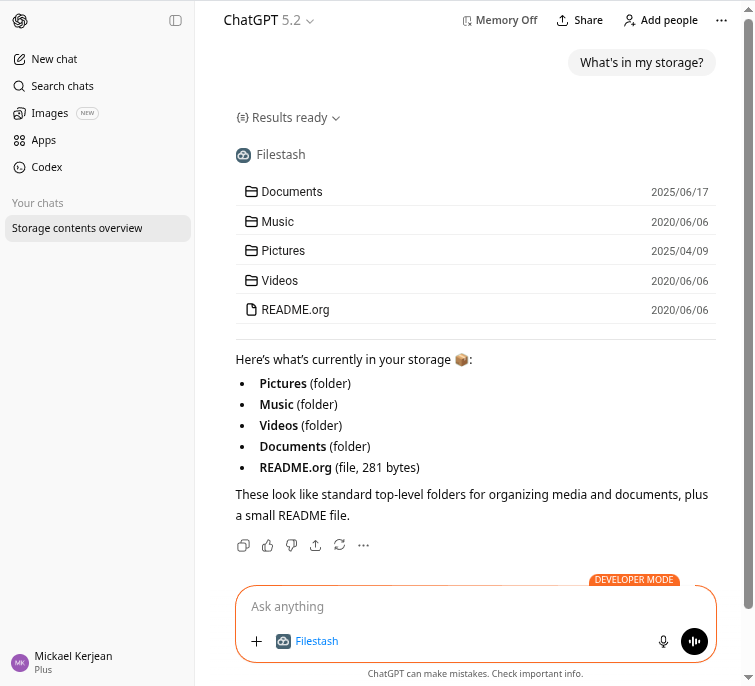
Other Gateways
SFTP and MCP are not the only protocols we do support, there are extras like S3, WebDAV and AS2.