Install and Upgrade
On this page:
Installation
Just want to look around first? Try the online demo, no install needed.
We maintain 2 community releases built with different trade offs: a single fat binary that’s lightweight with zero runtime dependencies (so it runs pretty much anywhere), and a Docker image that’s much faster at everything (particularly thumbnailing and video transcoding).
The simplest way is to download the binary and run it:
% Total % Received % Xferd Average Speed Time Time Time Current
Dload Upload Total Spent Left Speed
100 13.40M 100 13.40M 0 0 475.7k 0 00:28 00:28 1.09M
~/$ chmod +x filestash.bin
~/$ ./filestash.bin
2026/10/07 21:48:42 SYST INFO [http] starting ...
2026/10/07 21:48:42 SYST INFO [http] listening on :8334
Or with Docker, using our image from Docker Hub:
~/filestash$ curl -O https://downloads.filestash.app/latest/docker-compose.yml
% Total % Received % Xferd Average Speed Time Time Time Current
Dload Upload Total Spent Left Speed
100 322 100 322 0 0 98 0 0:00:03 0:00:03 --:--:-- 98
~/filestash$ docker compose up -d
[+] Running 3/3
✔ Volume "filestash_filestash" Created
✔ Container filestash_wopi Started
✔ Container filestash Started
First Setup
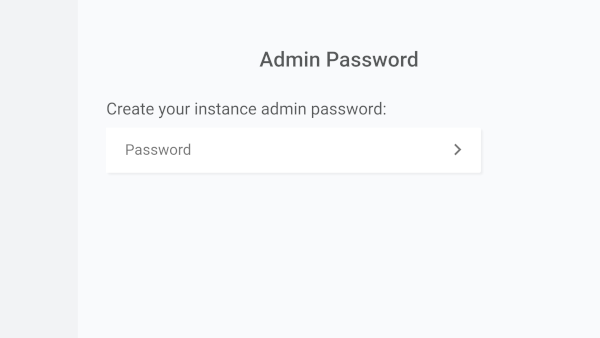
Whichever installation method you picked, open http://localhost:8334 (or your server’s address) and set your admin password:
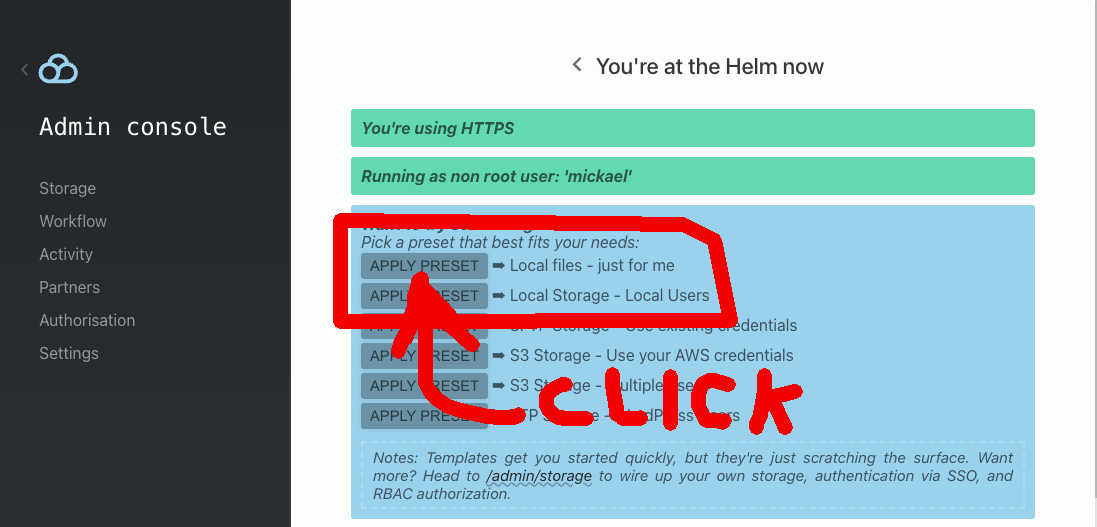
New to Filestash? Pick a preset: “local storage, just for me” is a great place to start, and you can build on it later:
That’s it: you now have a selfhosted file manager that does everything dropbox.com does. For the “folder that syncs across your devices” experience, install the Filestash Drive client on your devices and connect it to your instance.
For a lot of folks, that’s all they need. In practice though, this is where the interesting part begins: extending the base setup with plugins, adding support for about 140 niche file formats, installing a theme, combining various storages, plugging in your authentication, enforcing authorisation rules so everything stays under control, and much more.
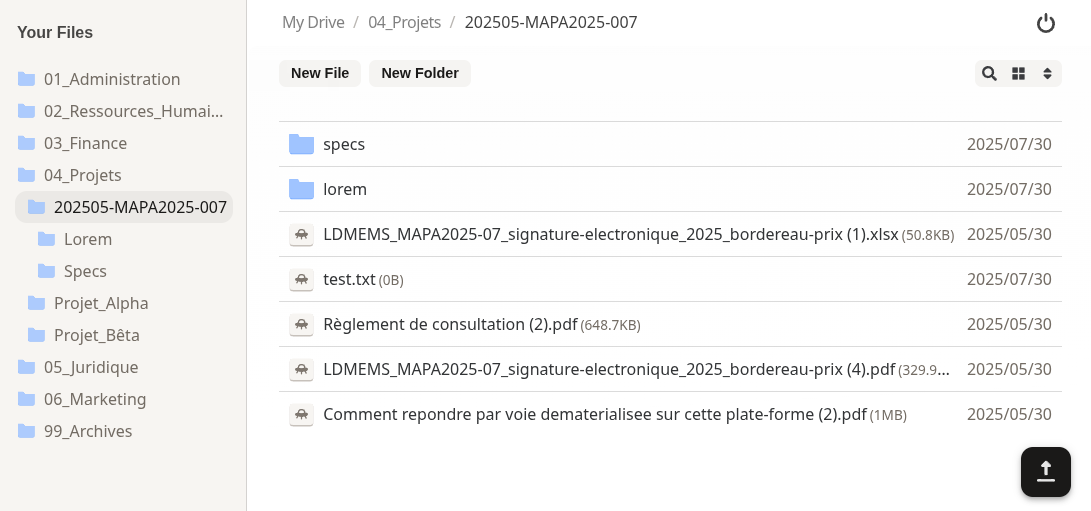
For example, drop the Dropbox theme into your plugin folder, restart your instance, and the design get rebranded as this:
Going Further
The 3 Pillars: Storage, Authentication & Authorisation
Keeping control over “who can do what and where” is the basis of a good file management system that can be used by both humans and agents. That control rests on 3 pillars: storage defines the “where”, authentication the “who”, and authorisation is the “can do what” that sits between the two. Each pillar has its own guide covering the topic at length and how it fits with the other two: Storage, Authentication and Authorisation.
Plugins
Filestash is built around one core principle: “anything that’s not a fundamental truth of the universe lives in a plugin”. That keeps the core lean and the opinions replaceable. Plugins control every aspect of how the software behaves: Filestash is really a framework for file management platforms, and plugins are the Lego blocks that let you customise anything.
For example, say you want your users to create PGP encrypted files with end to end encryption, where the keys never touch the server: download this plugin, drop it in the plugin folder and restart your instance. The next time you open a PGP file, you get a nice viewer and editor to work with pgp encrypted files.
For an in depth rundown of all the off the shelf plugins, head to the plugin page or get one of the plugins that support ~140 niche file formats. To make your own, start with the plugin development guide, the Rust plugin guide, or explore the cookbook.
Other Guides
Once you have a good grasp on the 3 pillars, there are other guides to take things further:
- Features: search, workflow engine, versioning, office documents, virtual filesystem
- Clients & Gateways: desktop client, storage gateways including the SFTP and MCP gateways
- Identity Providers: OIDC (with Azure and Keycloak walkthroughs), SAML, LDAP, URL authentication, debugging OIDC with curl
- Operations: configuration, Kubernetes with Helm, managing certificates, anatomy of the logs, our bcrypt tool, tips and tricks
Going to Prod
Enabling TLS
To deploy the base build in production, you will need a reverse proxy fronting the traffic and performing SSL termination there. That’s the setup powering the online demo, with nginx configured like this.
Customers have more flexibility in handling HTTPS, with additional options to expose Filestash as a native HTTPS service by either:
- loading your existing certificates directly into Filestash
- letting Filestash provision certificates at runtime via ACME and Let’s Encrypt. This method is “set and forget”, with no human intervention needed to renew certificates, no third party software, and no extra setup.
All those methods are documented here.
Enterprise Setup
Filestash is deployed in many sensitive environments with very stringent needs. If this sounds like what you are doing, you might want to read:
-
our hardening guide
-
some actual use cases we’ve worked on
-
some examples of architecture diagram that was made for a deployment in large pharma with requirements for high availability and scalability. You can read about that in this post from the AWS Blog:
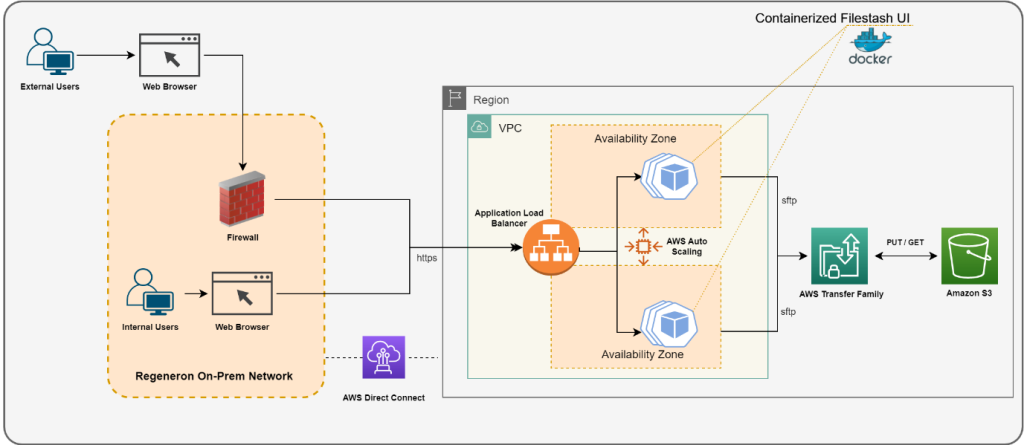
Source: How Regeneron built a secure and scalable file transfer service using AWS Transfer Family
Support Contract
We are in the business of building the best file management platform there is. There is more to Filestash than meets the eye, and it was made to handle the trickiest file management scenarios you can throw at it. If your use case is about file management, we want to hear from you.
Upgrade
To update Filestash:
% Total % Received % Xferd Average Speed Time Time Time Current
Dload Upload Total Spent Left Speed
100 322 100 322 0 0 98 0 0:00:03 0:00:03 --:--:-- 98
~/filestash$ docker-compose pull
Pulling app (machines/filestash:latest)...
latest: Pulling from machines/filestash
Digest: sha256:4da068a5868d736f6382618e6f8baa6cf44c1cf0f94a3ded05aa25b00a41f425
Status: Image is up to date for machines/filestash:latest
~/filestash$ docker-compose up -d
Recreating filestash_app ...
Recreating filestash_app ... done
Stay in the Loop
If you want to be in the loop about Filestash’s ongoing development, new releases and security updates, you might want to join the mailing list: