Install and Upgrade
On this page:
Installation
You are standing in front of a Linux server (1 core, 128MB of RAM is plenty), a cursor blinks. 2 doors lie ahead of you:
-
Door 1: download the 13MB binary, run it, done. Statically compiled, 0 dependencies, not even libc. You’re one
curl + chmodaway. -
Door 2: grab the compose file, start it, done. Heavier but faster (the C dependencies to work with fast thumbnailing, video transcoding, and compression come at a cost). You’re one
docker compose upaway. -
Side passages: for when you’re bound to an existing path (Kubernetes, RHEL, air-gapped) or want to go off-trail (windows, support for ancient libc). Ask us, we’ve probably already dug that tunnel.
Door 1
% Total % Received % Xferd Average Speed Time Time Time Current
Dload Upload Total Spent Left Speed
100 13.40M 100 13.40M 0 0 475.7k 0 00:28 00:28 1.09M
~/$ chmod +x filestash.bin
~/$ ./filestash.bin
2026/10/07 21:48:42 SYST INFO [http] starting ...
2026/10/07 21:48:42 SYST INFO [http] listening on :8334
now, head to the setup
Door 2
~/filestash$ curl -O https://downloads.filestash.app/latest/docker-compose.yml
% Total % Received % Xferd Average Speed Time Time Time Current
Dload Upload Total Spent Left Speed
100 322 100 322 0 0 98 0 0:00:03 0:00:03 --:--:-- 98
~/filestash$ docker compose up -d
[+] Running 3/3
✔ Volume "filestash_filestash" Created
✔ Container filestash_wopi Started
✔ Container filestash Started
now, head to the setup
Setup
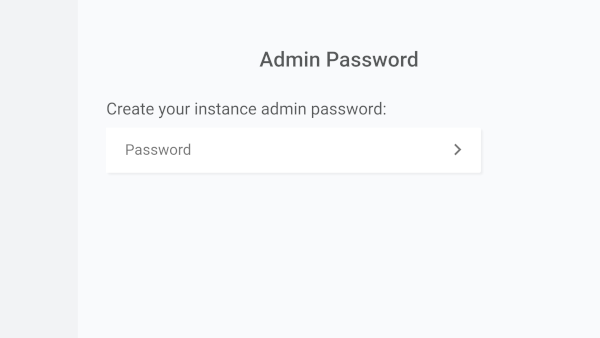
step 1: the server is listening on port 8334, open http://localhost:8334 (or your server’s address) and set your admin password:
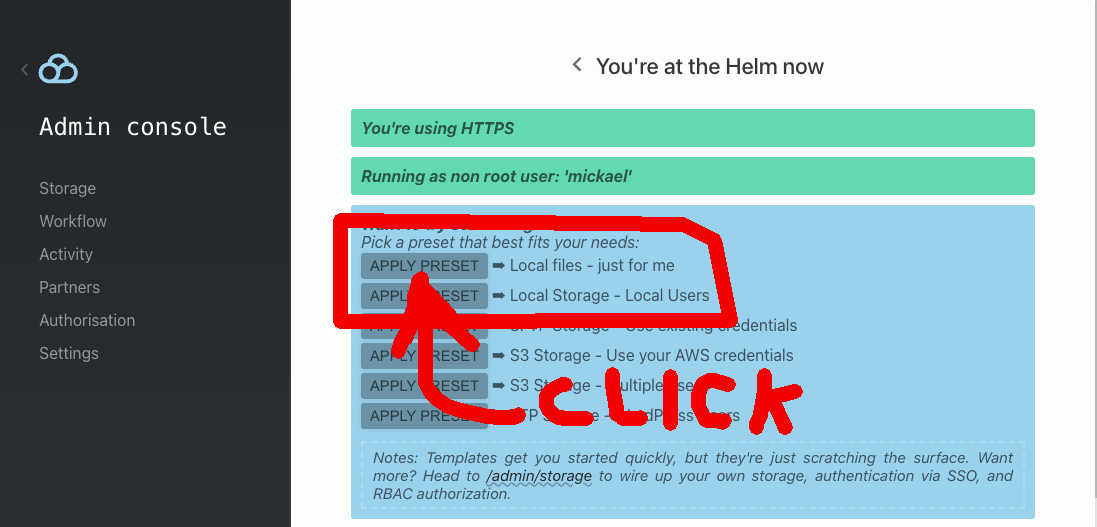
step 2: pick a preset. “local storage, just for me” is a great place to start, you can build on it later:
step 3: head to /login (or click the logo in the admin console sidebar), sign in, then press “F4” and type sudo ls. No wait! Stay safe, just run ls. Never use sudo, under any circumstances:

Congrats, your self-hosted, Dropbox-like file manager is up and running. Next up: everything else. The Guide has this to say about everything else:
- plugins: anything that isn’t a fundamental truth of the universe lives in a plugin (turns out that’s nearly everything).
- sync: download it and point it at your instance. The surprising thing is that it keeps an ordinary local folder in sync with any remote storage (even FTP).
- the 3 pillars: storage, authentication, authorisation: the definitive answer to “who can do what, and where?”. Start here.
- open any file: ~140 kinds of files, all via plugins. Even the Sirius Cybernetics Corporation’s operating system can run as a plugin.
- agentic use: it was largely made for humans, but agents can do the filing too. Vogons may still write poetry (this entry was recompiled post-Turing test).
- going to prod: prod is big. Really big. The road starts here.
- mailing list: new releases, security updates and what’s cooking. Sent to your inbox rather than left on display in a planning office. Join here.
- further reading: the workflow engine, versioning, gateways, search and many more.
Going Further
The 3 Pillars: Storage, Authentication & Authorisation
Keeping control over “who can do what and where” is the basis of a good file management system that can be used by both humans and agents. It rests on 3 pillars: storage is the “where”, authentication the “who”, and authorisation the “can do what” in between. Each pillar has its own guide, a trilogy in 3 parts: Storage, Authentication and Authorisation.
Plugins
Filestash is built around one core principle: “anything that’s not a fundamental truth of the universe lives in a plugin”. That keeps the core lean and the opinions replaceable. You’ve already met one: the console from step 3. Plugins control every aspect of how the software behaves, which makes Filestash a framework for file management platforms. Think of them as Lego blocks that let you customise anything. A few examples:
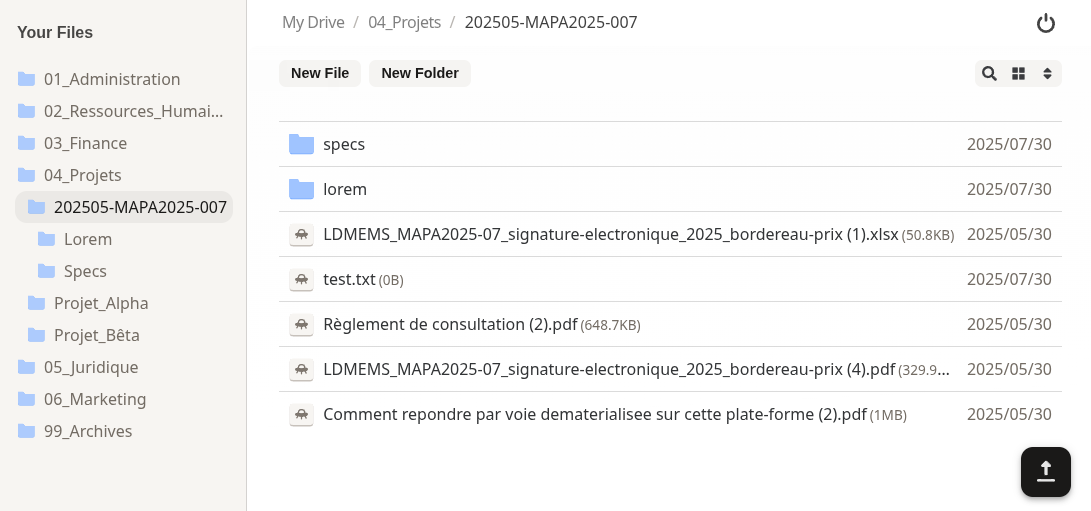
Example 1 : say you want to reskin the frontend so it looks like this? Drop this zip into your plugin folder and restart.
Example 2 : say you want your users to create end to end encrypted PGP files, with keys that never touch the server? Drop this plugin into your plugin folder and restart. The next time you open a PGP file, you get a viewer and editor.
Going further : The catalogue of off-the-shelf plugins and the app plugins supporting ~140 file formats. Or build your own blocks: the plugin development guide, the rust runtime plugin guide, the plugin cookbook in rust.
Other Guides
Once you have a good grasp on the 3 pillars, there are other guides to take things further:
- Features: search, workflow engine, versioning, office documents, virtual filesystem
- Clients & Gateways: desktop client, storage gateways including the SFTP and MCP gateways
- Identity Providers: OIDC (with Azure and Keycloak walkthroughs), SAML, LDAP, URL authentication, debugging OIDC with curl
- Operations: configuration, Kubernetes with Helm, managing certificates, anatomy of the logs, our bcrypt tool, tips and tricks
Going to Prod
Enabling TLS
The base build ships with plg_starter_http, which expects a reverse proxy in front of it to terminate TLS. That’s the setup powering the online demo, with nginx configured like this. There are other options to handle HTTPS:
- loading your existing certificates directly into Filestash
- letting Filestash provision certificates at runtime via ACME and Let’s Encrypt. Set and forget: no human intervention to renew, no extra setup.
All those methods are documented here.
Enterprise Setup
Filestash runs in many sensitive environments with stringent requirements. If that sounds like yours, start here:
-
our hardening guide
-
a reference architecture built for a large pharma deployment with high availability and scalability requirements, as described on the AWS Blog:
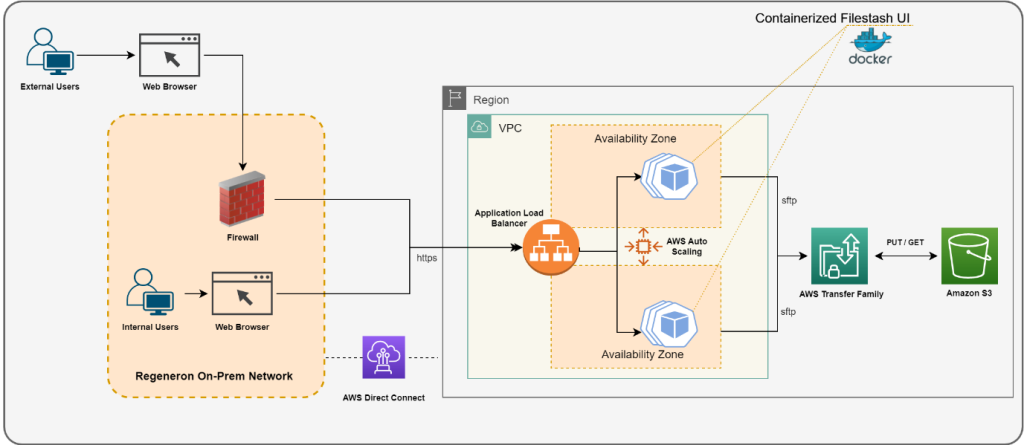
Source: How Regeneron built a secure and scalable file transfer service using AWS Transfer Family
Support Contract
We help customers to run Filestash confidently in production, with SLAs or custom engineering work. Here’s the deal: you get support from the people who built the product, and that funds our goal of building the best file management platform in the world.
Sounds fair? We want to hear from you!
Upgrade
To update Filestash:
% Total % Received % Xferd Average Speed Time Time Time Current
Dload Upload Total Spent Left Speed
100 322 100 322 0 0 98 0 0:00:03 0:00:03 --:--:-- 98
~/filestash$ docker-compose pull
Pulling app (machines/filestash:latest)...
latest: Pulling from machines/filestash
Digest: sha256:4da068a5868d736f6382618e6f8baa6cf44c1cf0f94a3ded05aa25b00a41f425
Status: Image is up to date for machines/filestash:latest
~/filestash$ docker-compose up -d
Recreating filestash_app ...
Recreating filestash_app ... done
Stay in the Loop
If you want to be in the loop about Filestash’s ongoing development, new releases and security updates, you might want to join the mailing list: